Sketchbook
Putting ideas on 'paper' brings them to life
These sketches span my eight years designing Goodnotes features. While many stayed as drawings, I wanted to celebrate the creative process behind them.
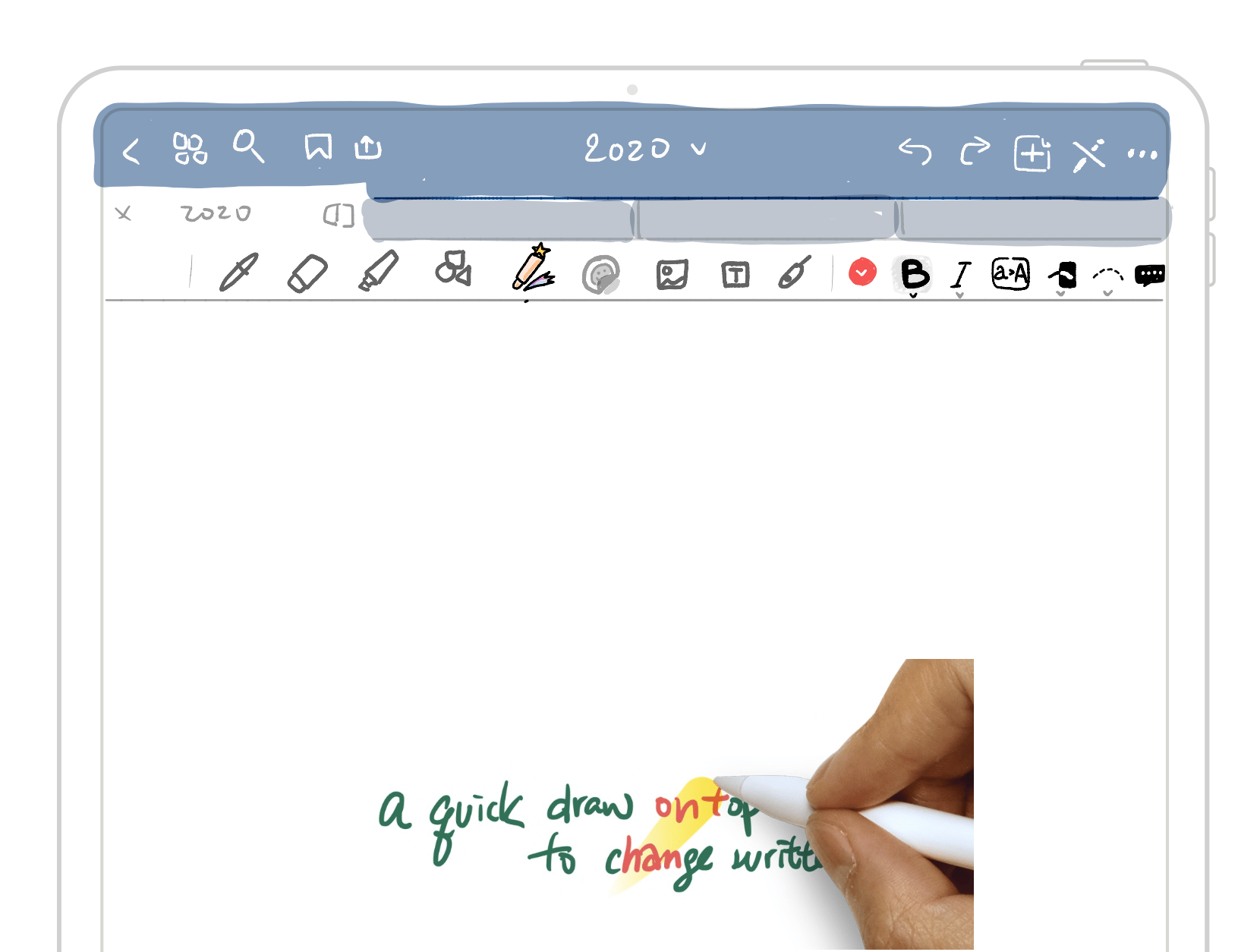
Magic Pen
Imagine a pen that can instantly change its color, thickness, or even edit your writing, just like you can with typed text. Although it never went into production, it's a fascinating idea!
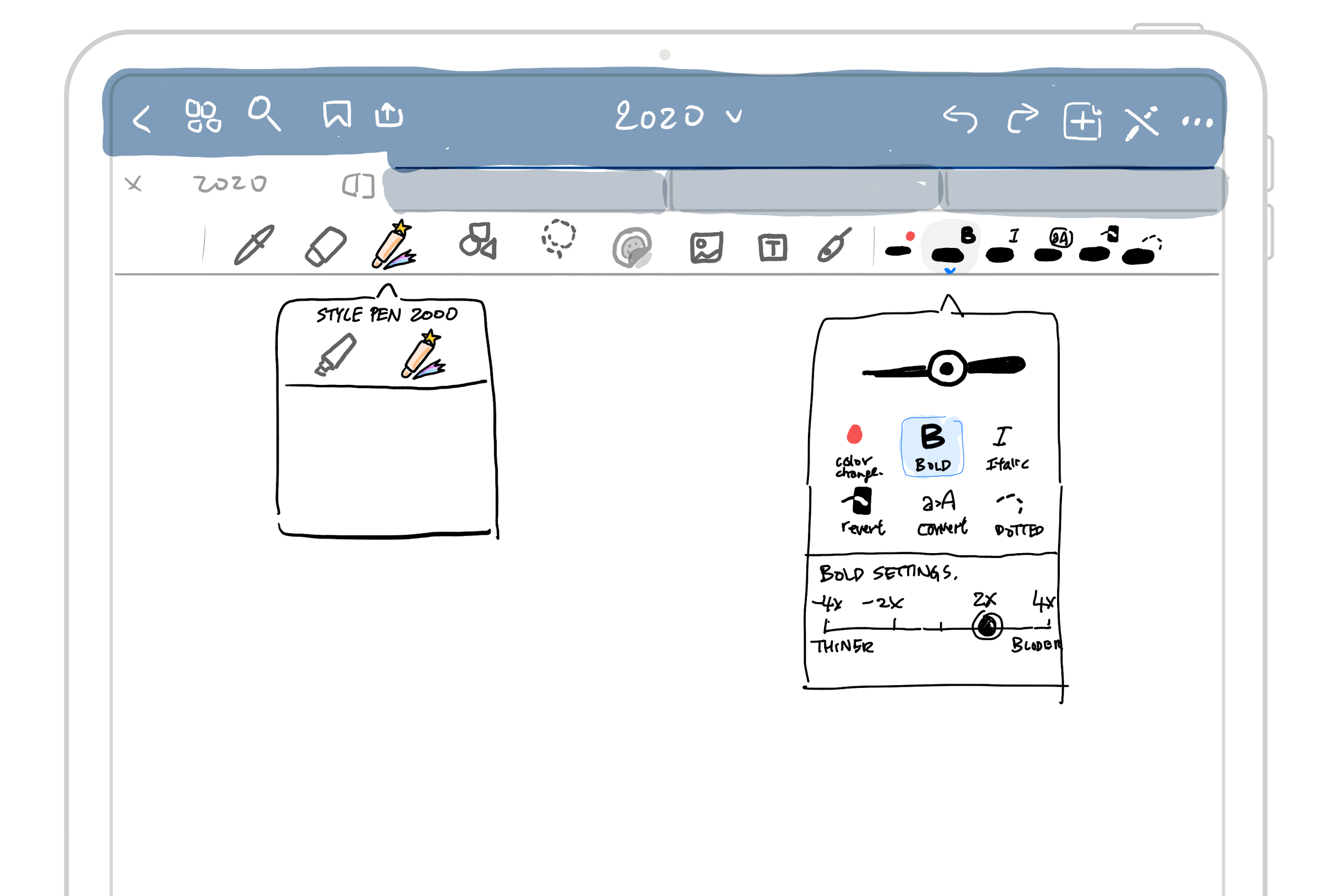
options to switch features and modify your notes.
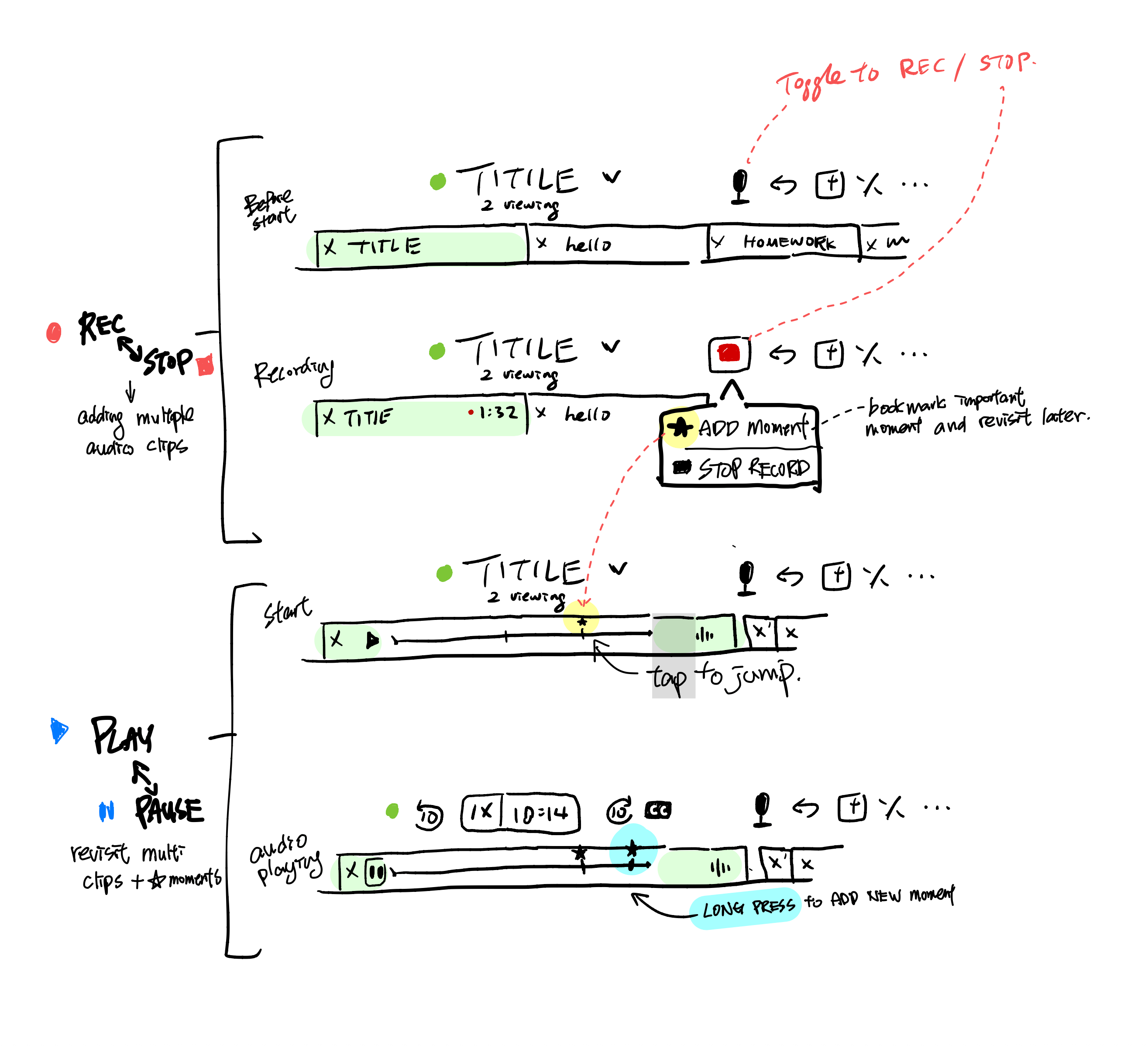
Audio Recording
It would be helpful to let users bookmark moments during recording for easy reference to important parts when listening later.
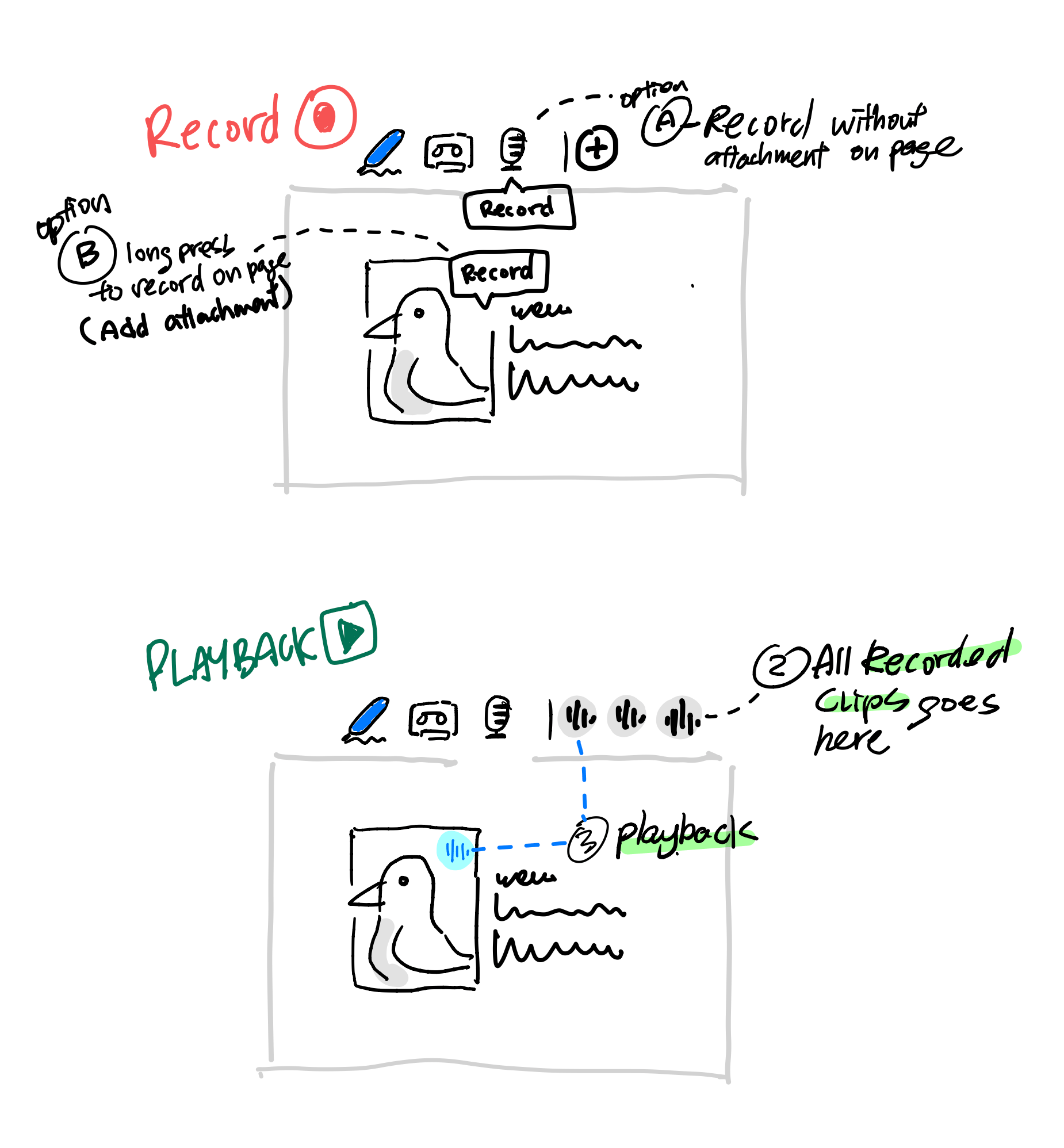
I initially envisioned adding a playback feature next to the visuals, so users could hear audio notes. For instance, a nature science teacher could record a sample audio explaining the sound of a seagull.
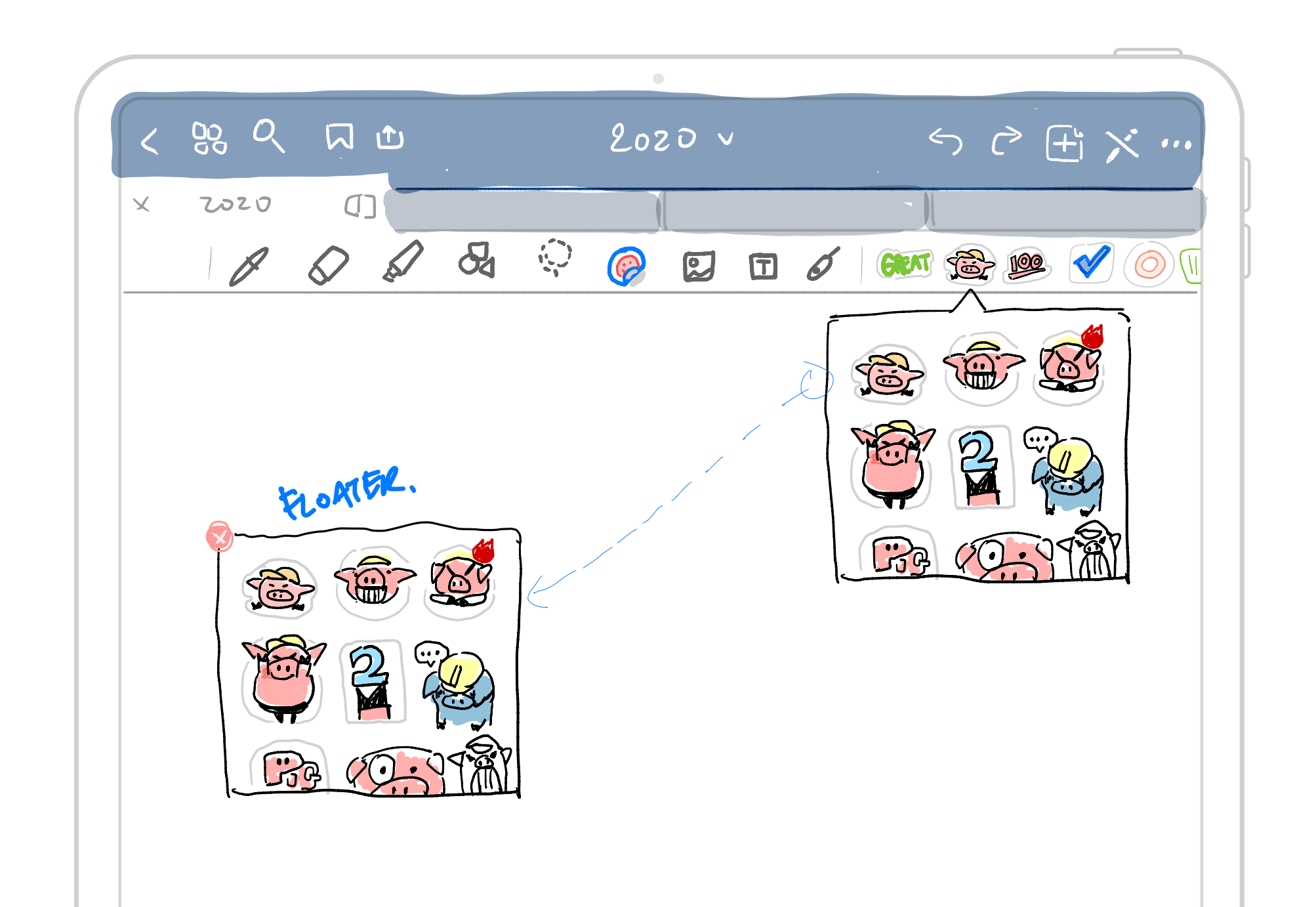
Elements (create your own sticker)
The idea behind elements is to let users create and transform their drawings into reusable sets, not just stickers. Unfortunately, the Floating Window didn’t get realized.
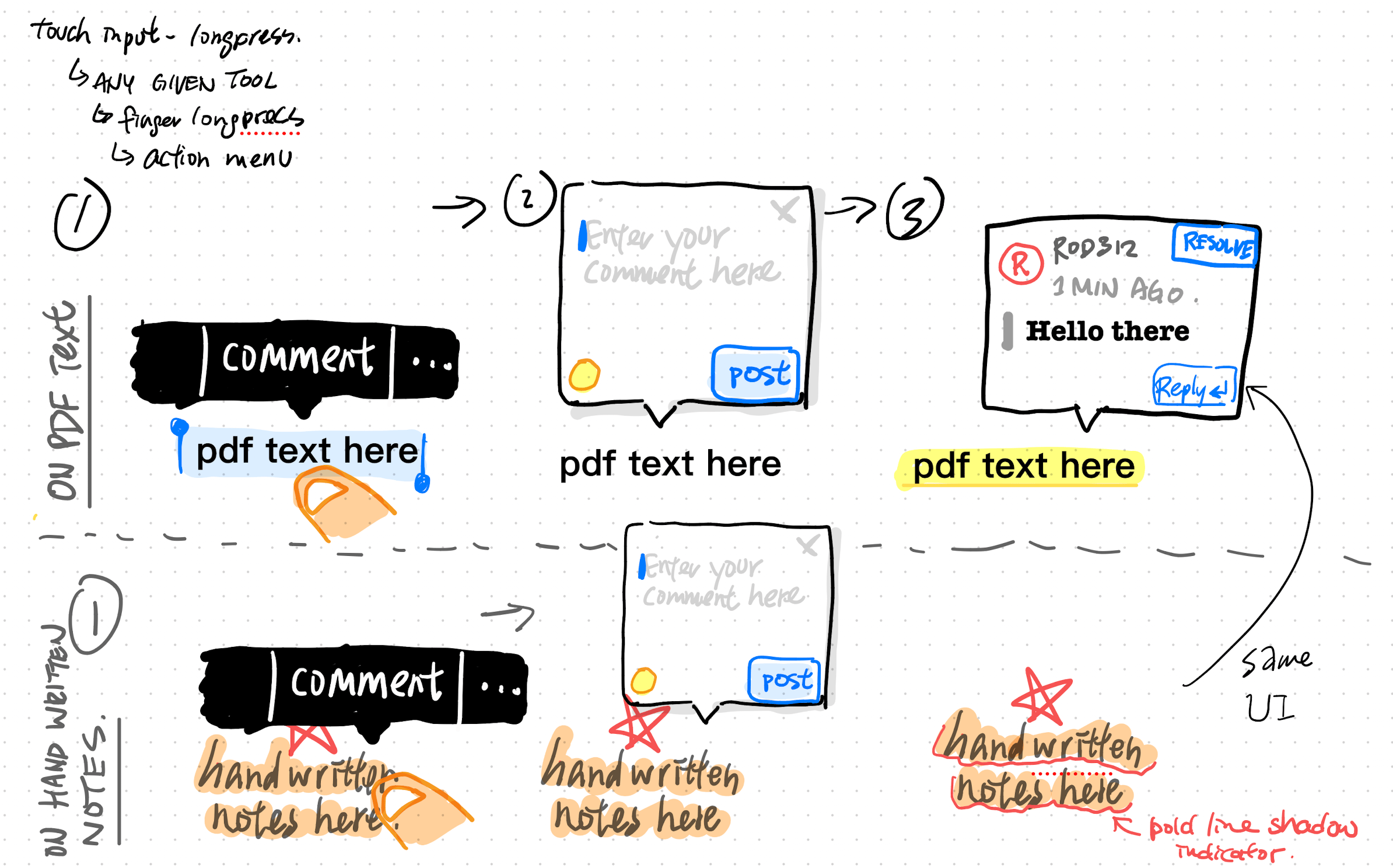
Incorporating comments into handwritten notes Users can not only add comments to typed text but also tap and select portions of their written notes to embed comments directly within the content.
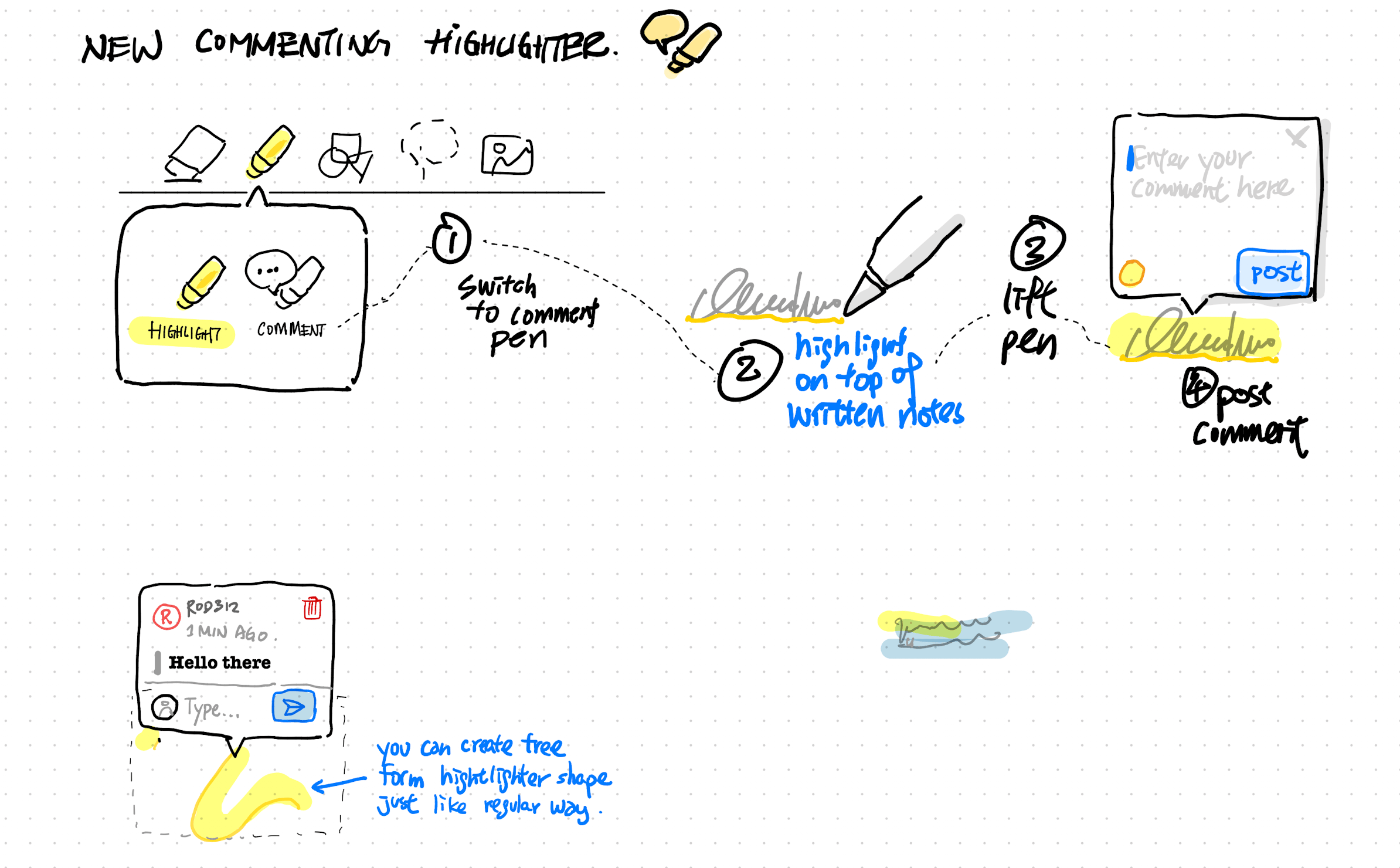
Highlighter become a way to add comments for any kind of notes (in free form)
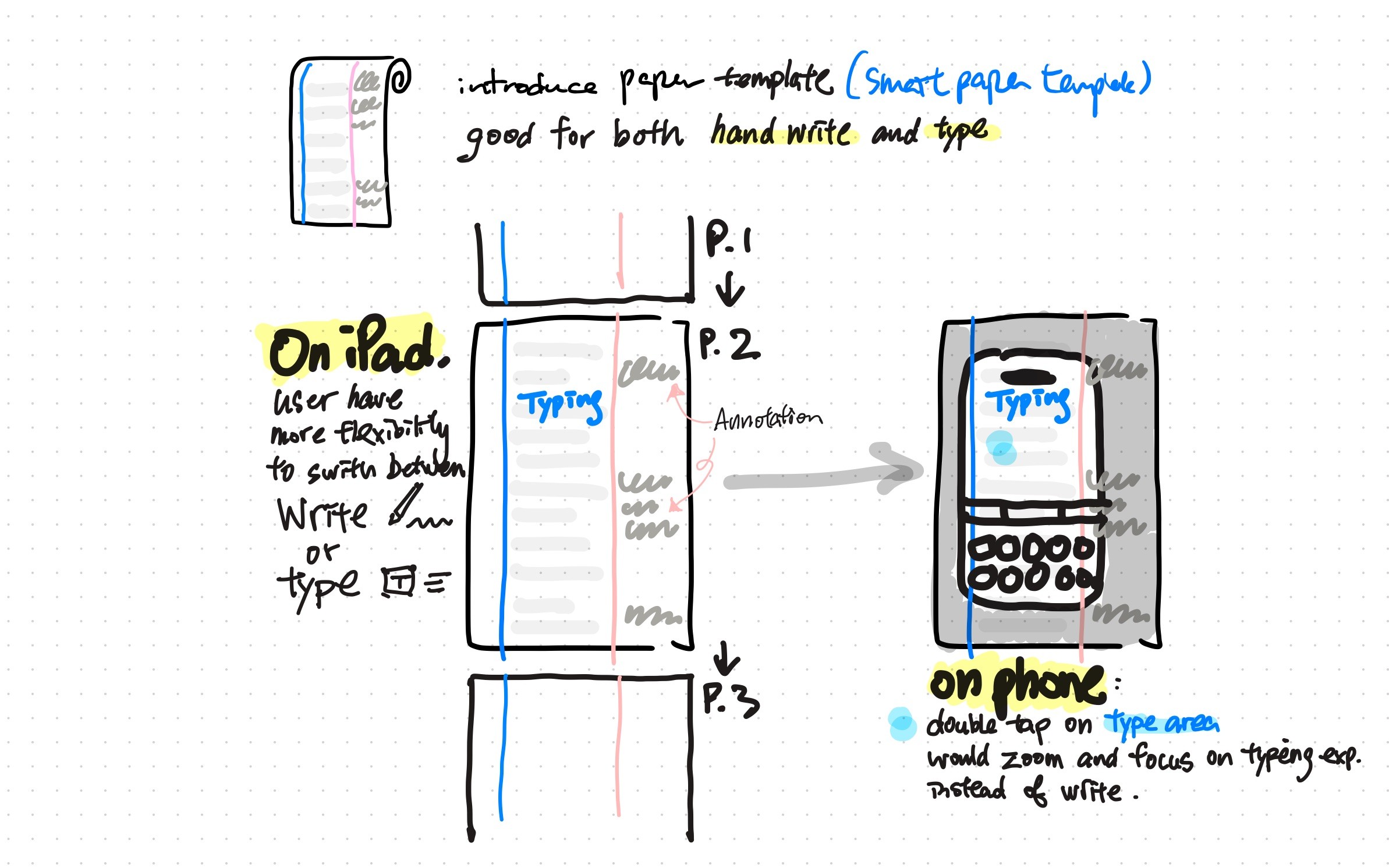
Enhanced Typing Support Compared to Annotation
To enhance typing across devices, we could introduce a browser-like feature enabling users to double-tap a “div” to focus on the text block. These templates will help users better understand note-taking, especially for those wanting to combine typed and handwritten content.
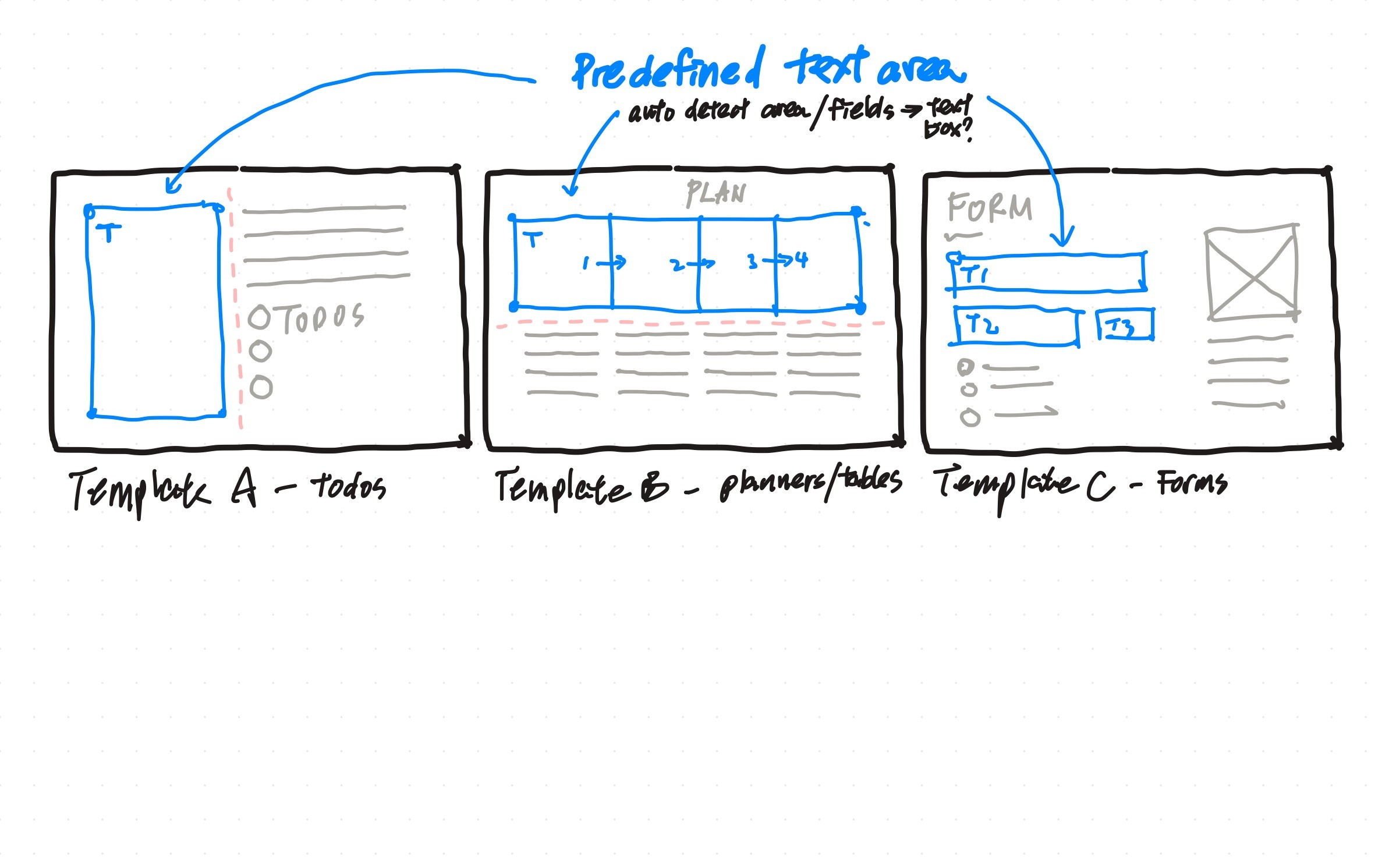
The smart template can read and detect text boxes, enabling users to tap and type seamlessly, transferring their content from one box to another. This template enhances the experience for those looking to create more structured notes.
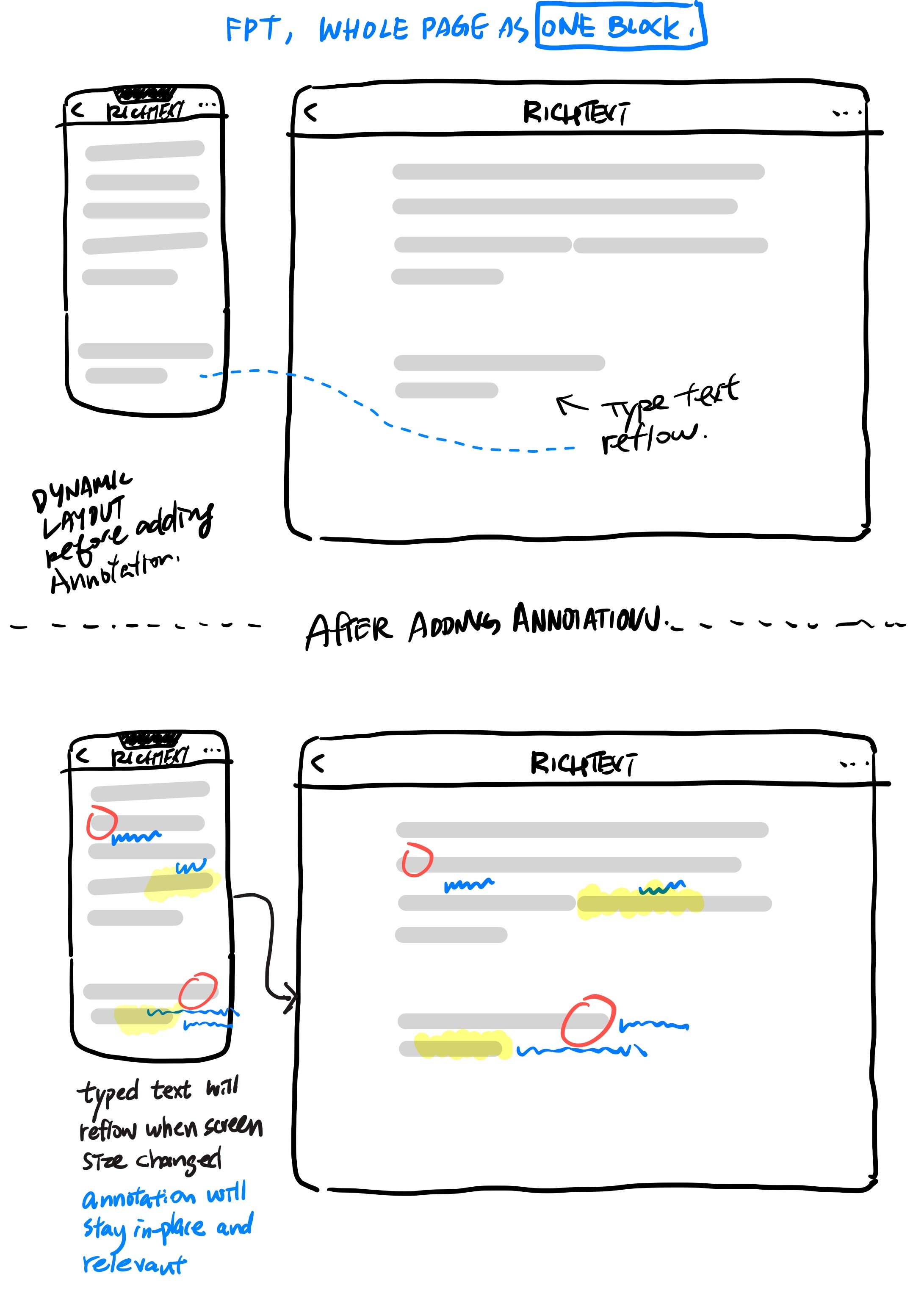
Smart AnnotationSmart Annotation lets you handwrite notes and automatically attach to nearby text, so your annotations move and stay aligned when the document when edited, making handwritten comments behave like part of the content rather than floating drawings.
Sketchbook
Putting ideas on 'paper' brings them to life
These sketches span my eight years designing Goodnotes features. While many stayed as drawings, I wanted to celebrate the creative process behind them.
Magic Pen
Imagine a pen that can instantly change its color, thickness, or even edit your writing, just like you can with typed text. Although it never went into production, it's a fascinating idea!
options to switch features and modify your notes.
Audio Recording
It would be helpful to let users bookmark moments during recording for easy reference to important parts when listening later.
I initially envisioned adding a playback feature next to the visuals, so users could hear audio notes. For instance, a nature science teacher could record a sample audio explaining the sound of a seagull.
Elements (create your own sticker)
The idea behind elements is to let users create and transform their drawings into reusable sets, not just stickers. Unfortunately, the Floating Window didn’t get realized.
Incorporating comments into handwritten notes Users can not only add comments to typed text but also tap and select portions of their written notes to embed comments directly within the content.
Highlighter become a way to add comments for any kind of notes (in free form)
Enhanced Typing Support Compared to Annotation
To enhance typing across devices, we could introduce a browser-like feature enabling users to double-tap a “div” to focus on the text block. These templates will help users better understand note-taking, especially for those wanting to combine typed and handwritten content.
The smart template can read and detect text boxes, enabling users to tap and type seamlessly, transferring their content from one box to another. This template enhances the experience for those looking to create more structured notes.
Smart AnnotationSmart Annotation lets you handwrite notes and automatically attach to nearby text, so your annotations move and stay aligned when the document when edited, making handwritten comments behave like part of the content rather than floating drawings.
Rodney Chow
Staff Designer at Goodnotes
Currently living in the Bay Area, California
Keep in touch
Sketchbook
Putting ideas on 'paper' brings them to life
These sketches span my eight years designing Goodnotes features. While many stayed as drawings, I wanted to celebrate the creative process behind them.
Magic Pen
Imagine a pen that can instantly change its color, thickness, or even edit your writing, just like you can with typed text. Although it never went into production, it's a fascinating idea!
options to switch features and modify your notes.
Audio Recording
It would be helpful to let users bookmark moments during recording for easy reference to important parts when listening later.
I initially envisioned adding a playback feature next to the visuals, so users could hear audio notes. For instance, a nature science teacher could record a sample audio explaining the sound of a seagull.
Elements (create your own sticker)
The idea behind elements is to let users create and transform their drawings into reusable sets, not just stickers. Unfortunately, the Floating Window didn’t get realized.
Incorporating comments into handwritten notes Users can not only add comments to typed text but also tap and select portions of their written notes to embed comments directly within the content.
Highlighter become a way to add comments for any kind of notes (in free form)
Enhanced Typing Support Compared to Annotation
To enhance typing across devices, we could introduce a browser-like feature enabling users to double-tap a “div” to focus on the text block. These templates will help users better understand note-taking, especially for those wanting to combine typed and handwritten content.
The smart template can read and detect text boxes, enabling users to tap and type seamlessly, transferring their content from one box to another. This template enhances the experience for those looking to create more structured notes.
Smart AnnotationSmart Annotation lets you handwrite notes and automatically attach to nearby text, so your annotations move and stay aligned when the document when edited, making handwritten comments behave like part of the content rather than floating drawings.